 ScyllaChat
Presets & prompts
A preset decides what the model actually receives: the system prompt, where the character's card lands, and what gets injected around your chat. If you have SillyTavern presets, they load unchanged.
How the prompt is built
When you send a message, ScyllaChat assembles the request from four sources, in the order your preset defines:
- the preset's prompts: your system instructions, in an editable order,
- the character card: description, personality, scenario and examples, placed by markers,
- the chat history: trimmed from the oldest end to fit your token budget,
- and the injections: lorebook entries, Author's Note, and depth-positioned prompts counted from the end of the chat.
Markers are placeholders inside the prompt order. Chat History is where your conversation goes, Char Description is where the card's description lands, World Info is where lorebook entries appear. Drag them like any other prompt.
Relative and depth-injected prompts
Each prompt is either relative (it sits where it is in the order) or absolute (it is injected into the chat itself, a chosen number of messages from the end). Depth injection is how you keep an instruction close to the model's attention no matter how long the chat gets. Depth 0 lands after the last message, depth 4 sits four messages back.
Macros
Anywhere text goes into a prompt, macros go with it: names, card fields, dice rolls, variables and sub-requests. The full list lives in the macros reference.
Author's Note
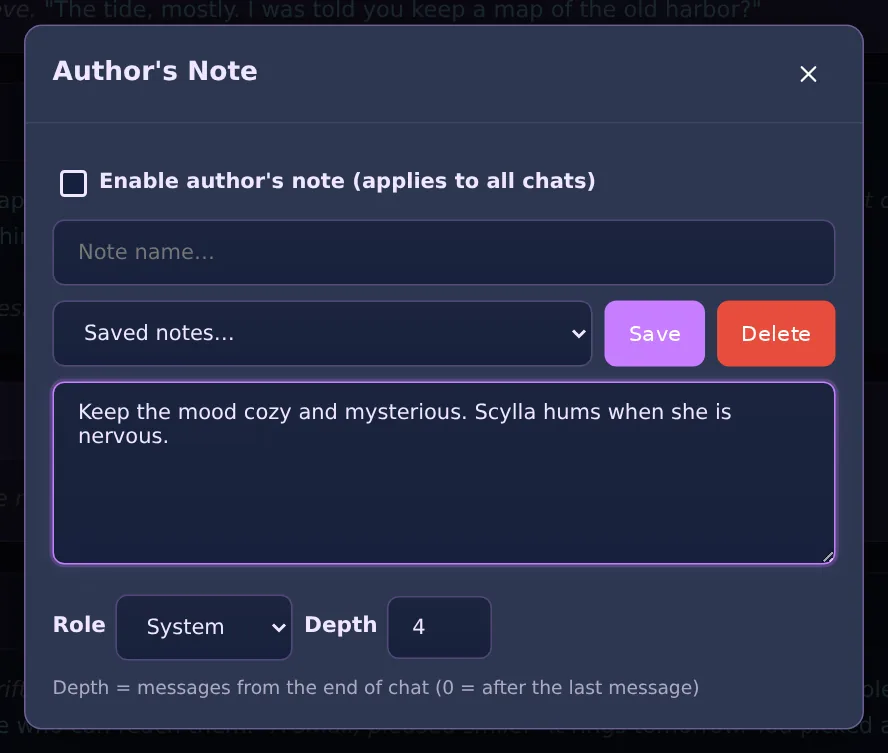
A global note injected near the end of the chat, where the model pays the most attention. It steers tone, pacing or format without editing the preset. Open it from the ⋯ menu in the chat.
- Depth: how many messages from the end it sits (0 means after the last message).
- Role: system, user or assistant voice.
- Library: save notes by name and swap them per scene. A green dot on the menu entry shows when a note is live.
Prompt processing
Also in the ⋯ menu: a final transform applied to the whole prompt before it is sent. None is the default. The rest exist for picky endpoints and special techniques:
- Merge consecutive roles: joins back-to-back messages of the same role.
- Semi-strict / Strict: enforce single-system and user-first shapes some APIs require.
- Single user / Single system message: collapse everything into one message.
- NoAss: the whole chat becomes one assistant message with name-prefixed turns, so the model continues the story as its own prefill instead of answering you like an assistant.
Generation settings
Temperature, penalties, top-p and Max Response Tokens live in the API tab, next to Context Size (the total the prompt has to fit in), with optional samplers (top-k, min-p, typical-p, logit bias, seed) you can enable per need. Prefill in the ⋯ menu controls whether your last message is sent as the final turn or leaves room for an assistant-voice tail. Roleplay presets usually want prefill on.
For Claude there is also prompt caching (on by default): unchanged context is re-read at a fraction of the input price, which makes swipes and long chats much cheaper.