 ScyllaChat
Characters & chats
A character card is the person (or thing) you talk to: its voice, its history, its opening line. ScyllaChat reads and writes the same cards the rest of the ecosystem uses.
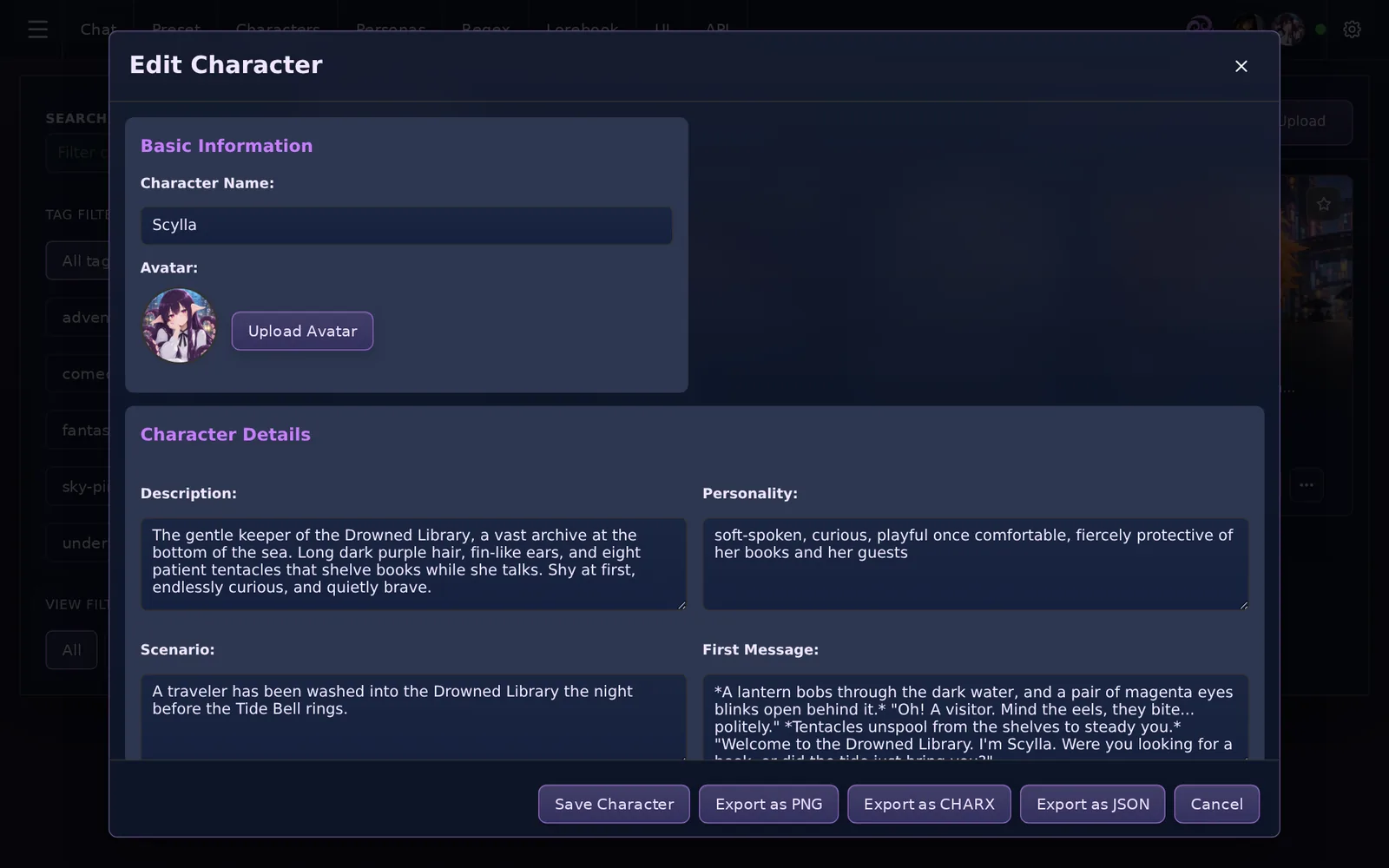
Cards: import, create, export
The Characters tab lists every card you have. From here you can:
- Import a
.pngcard (the JSON travels inside the image) or a.charxarchive. SillyTavern V2/V3 and RisuAI cards work, including embedded assets, display scripts and Lua triggers. - Create a card from scratch: name, description, personality, scenario, first message and example dialogue.
- Export any card back to PNG to share it.
Chat and edit sit on every card. The rarer actions (tags, lorebooks, delete) live in the card's ⋯ menu, and deleting always asks first.

What the fields do
Every field is optional except the name, but each one steers the model differently:
- Description: who the character is. Sent with every message.
- Personality: a short trait summary. Some presets place it separately from the description.
- Scenario: where the story starts.
- First message: the greeting that opens every new chat. Supports macros like
{{user}}and{{char}}. - Example dialogue: sample exchanges that teach the model the character's voice.
- System prompt: card-level instructions. With
{{original}}inside, it wraps your preset's main prompt instead of replacing it.
{{user}} becomes your persona's name.Personas
A persona is you in the story: a name and a description the model sees alongside the character. Create them in the Personas tab and switch between them at any time. {{user}} in any prompt resolves to the active persona's name.
Chats, swipes and editing
- Multiple chats per character: each card keeps its own chat list. Switch or start fresh from the ⋯ menu next to the composer, or from the card itself.
- Swipes: every AI reply can hold alternative versions. Use the arrows under a reply to move between them; swiping past the last one generates a new take. All versions stay saved.
- Edit anything: your messages and the AI's are both editable in place. The story continues from what is on screen.
- Rename: give a chat its own title from the ⋯ menu on its card in Recent Chats. Clear the title to go back to the automatic name.
- Regenerate: redo the last reply from the ⋯ menu or the retry button on the last message.
Group chats
Put several cards in one room. Each reply is generated from the active speaker's card, with the rest of the conversation name-prefixed so the model can follow who said what. Manage members and speaking order from the group chat panel in the Characters tab.
Card scripts and triggers
Cards that ship with RisuAI-style trigger scripts run them in a sandboxed Lua engine: variables, conditional greetings, interactive buttons inside messages. Display scripts that build custom in-chat UI are supported too. Both are opt-in per character, so a card never runs code without you enabling it.