 ScyllaChat
Call Pipeline
The pipeline wraps extra model steps around your main generation, drawn as a node graph. Prepare context before the reply, rewrite it afterwards, judge candidates, or loop until a check passes.
The graph
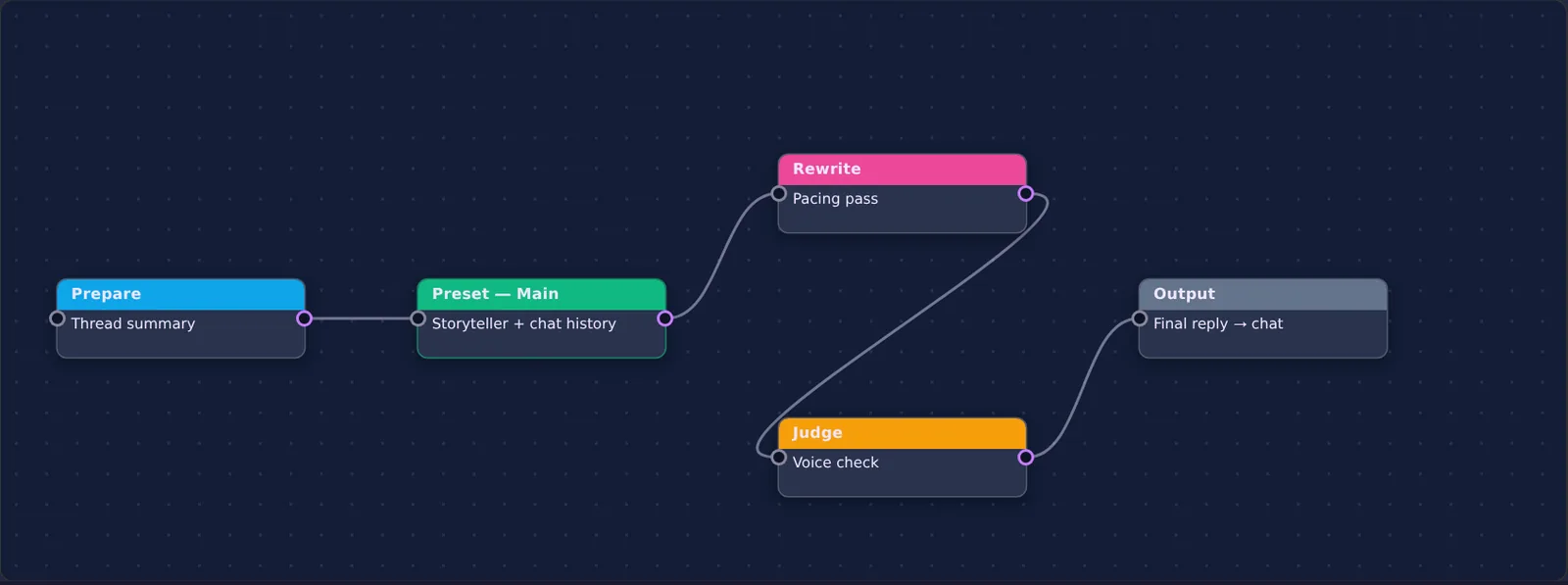
Open the Preset tab's Call Manager section and enable the pipeline. The canvas starts with two fixed blocks: Main (your active preset plus chat history, the generation you would get anyway) and Output (whatever flows in here lands in the chat). Everything else you add and wire yourself.
Wiring semantics
- Left of Main: blocks wired into Main become Prepare steps. Their output is injected as context before the chat, so Main generates with their result in hand.
- Right of Main: blocks receiving Main's output become Rewrite steps. They transform the reply before it reaches Output.
- Judge with several inputs: wire two or more blocks into a Judge and it picks the best output among them.
- Judge with one input: it loops that block, re-running it with feedback until the judge approves or the attempt limit is hit. A boolean judge routes yes and no to different wires.
- Gate: a cheaper loop, retry a block until a condition holds, up to its max attempts.
Drag from a block's right port to another block to wire, or tap the port and then the target's left port. Click a block to edit its instructions, model, preset and sampling overrides. Each block can use a different model, so a small fast model can judge while a large one writes.
Pipeline presets
The whole graph saves under a name from the toolbar: build a "quality pass" pipeline once, load it whenever a scene deserves it, export it as JSON to share. Delete or switch pipelines without touching your prompt preset.
Calls and the {{call:}} macro
A call is a saved sub-request with its own prompt, model and settings. Reference it as {{call:name}} inside any prompt text and its answer is generated and pasted in place before the main request runs. Calls nest up to five levels and cache their results within a generation. Pipeline blocks can run a saved call instead of inline instructions, so the same building blocks work in both systems.
A word on cost
Every block is a real model request. A prepare step plus a rewrite pass triples the calls per message. The pipeline is at its best switched on for the scenes that matter, not as a permanent default, which is exactly what pipeline presets are for.